-
Re: The TBCS Overclocking Thread
I can fire up the old backup gamer. Dont expect to much......its a micro ATX asus w/ no overclocking friendly stuff. I will play around with it today to see what it will do.
This is my last day OF vacation :dead: :dead: :dead: so sad
EDIT...I was looking @ the scores in the tables and my Vcore voltage isnt 1.2something...It was actually 1.5v. I dont know why CPUz doesnt read it right. It never has
-
Re: The TBCS Overclocking Thread
alot of info provided in the pics, but I figured I'd post in text for easyness. - p.s. I know it's no major feat to get .13 oc but for some reason it just seems so much faster! ( maybe the ram ;)?)
Please provide the following:
CPU Name: Intel Celeron D 325
Clock Speed: (2.53 base) 2666 MHz
CPU Volts: 1.376-1.392
Idle Temps: 41C
Load Temps: 57C
Cooling Method (Air, Water, TEC, Phase, LN2): Air
Heatsink/Waterblock Model: Intel oem copper rod core
Motherboard: MSI PM8M-V
RAM (Amount and Brand) (kingston valueram)-Samsung M3 68L6523DUS-CCC rev7 (512)
Samsung M3 68L6423ETM-CCC rev8 (512)
RAM Speed: 200mhz(base) - 210 (oc'd)
RAM Timings: 3.0.3-3-8(base) 3.0.4-4-9 (oc'd)
RAM Voltage: 2.7
Operating System windows xp pro sp2
Idle
Stressed-Ortho
linked due to image size
also I'm pretty sure everest has my sensors for the fanspeed backwards, hence the other monitor just incase. and I shut down part way through the second run in ortho because I wasn't sure if it would hold at 57, and because the second monitor times out. damn my lack of moneys.... the cpu specs say it tops out at 67C but I don't feel like testing my fate any more than already achieved.
-
Re: The TBCS Overclocking Thread
Mysteriphys, is that a first OC? If so, great job! First OCs are so much fun.
One thing though; you actually underclocked your RAM. The lower the timings, the faster.
-
Re: The TBCS Overclocking Thread
well it's been 2.6 with no changes in the ram for a long time, I popped on here, and found this thread and figured, what the hell eh, lets do something fun! lol, and LOL to my ram, I figured something was up, but everything runs fine, I'll go back and fix that right now actually! (although I did slightly up the voltage I imagine that probly did something fun :-P
just peeked at something and realized something odd, the clock is normally 200, it's 210 now.... so, it's underclocked but still overclocked?
-
Re: The TBCS Overclocking Thread
Yep, underclocked timings but overclocked speed. It's like taking one step forward, but then another step back. Fix up the timings and it'll be good to go.
-
Re: The TBCS Overclocking Thread
ok just so I'm sure I've got this.. cl3.0 is better than 2.5 but 3-3-8 is better than 4-4-9? or is 2.5 still better than?
also, nothing seems to be changing when I change that info (as far as the clock readout) is it possible my ram is locked and my cpu oc is just effecting my ram as well?
-
Re: The TBCS Overclocking Thread
Lower is better no matter what for RAM. If you had 2.5-3-3-8 it would be better.
RAM clock shouldn't change with the timings. RAM clock changes with the FSB (Front Side Bus). When you raise the FSB to OC the CPU, it changes the way the CPU interacts with the RAM and the RAM gets OC'd too.
-
Re: The TBCS Overclocking Thread
if thats the case is it possible to messure the positive output of a timing set? or is it a feel it as it works kind of thing?
-
Re: The TBCS Overclocking Thread
Quote:
Originally Posted by
Mysteriphys

if thats the case is it possible to messure the positive output of a timing set? or is it a feel it as it works kind of thing?
Benchmark scoring programs are the best way to see positive output. Without an overclock 500Mhz or so, you probably won't even notice a real difference. Programs may load a second or two faster, but you won't be saying "Woah is that blazing fast!"
-
Re: The TBCS Overclocking Thread
lol ok, well sorry for hijacking the thread, thanks for the info :-D I'll keep it in mind when I finally got the cash to go 2C.
-
Re: The TBCS Overclocking Thread
An easy program to see ram differences is Aquamark03. You can see benefits really well on that program....Even the slightest settings will impact the score...plus if you have a fast PC it only takes about 1min to complete:bunny:
-
Re: The TBCS Overclocking Thread
awesome, downloading now, thanks for everything :-D
19x multiplier got nothing to do with what I'm doing, my bad, up to 2.7. heats climbing, have to think of a solution... I got a spare fan here somewhere :-P
-
Re: The TBCS Overclocking Thread
got it, I got like 15,*** not good, probly this damned 6200 le rev a :-/
-
Re: The TBCS Overclocking Thread
Scotty and Crenn, In your overclock lists you should have stock speed and OC percentage columns so that we can see how much of an overclock it is.
-Indybird
-
Re: The TBCS Overclocking Thread
Well my lists are only a summary. Scotty may be fine with it though
-
Re: The TBCS Overclocking Thread
ill get onto it tomorrow. hopefully Excel will make it easy, i don't like percentages...
-
Re: The TBCS Overclocking Thread
All you need to do is provide the stock speed and then do =(((Overclocked)/(Stock))-1)*100.
If I overclocked to 3600MHz and stock was 2400. It's 50% more speed.
-
Re: The TBCS Overclocking Thread
update unstable at 2.7 locks up when I play cs, video is oc locked unless I get an outdated driver, but then everything bugs me to update, not worth it, so my original oc specs stand. aside from the ram, 2.5 3-3-7
-
Re: The TBCS Overclocking Thread
Getting my opteron system on tuesday as long as usps is in a good mood... considering i bought it for oc'ing ability, hopefully ill be able to add an amd entry this week
-
Re: The TBCS Overclocking Thread
Well here's mine.
Q6600 @ 3.42GHz
Idle temps 44, 43, 35, 35, average (add all up divide by amount) = 157/4 = 39.25 , we'll say 40
Screen
Load temps after 10mins w/ Prime 95 on all cores = 65, 63, 57, 57 = 60.6 = 61
Screen
BTW Core Temp isn't my CPU it's my GPU
Probably doesn't help that my room is about 27*C...
CPU Name: Q6600
Clock Speed: 3,420GHz
CPU Volts: 1.512
Idle Temps: 40
Load Temps: 61
Cooling Method: Water
Heatsink/Waterblock Model: D-Tek FuZion
Motherboard: Asus Blitz Formula SE
RAM: 2GB Crucial Ballistix 677MHz
RAM Speed: 760MHz
RAM Timings: 4-4-4-12
RAM Voltage: 2.25
Operating System:Vista 32
There we go all lists updated with Overcloked %.
-
Re: The TBCS Overclocking Thread
Alright. Specs:
Intel C2D E4500 Allendale "2.2GHz" @ 2409MHz (219*11)
MSI Neo5 Intel i945P, American Megatrends BIOS
2gb PNY Optima RAM, Dual Channel, DDR2-5300 (333MHz)
eVGA e-GeForce 7800GT PCI-e x16
Screenshot:
Temps:
19c @ fan (idle)
29c @ cores (idle)
35c @ fan (load)
45c @ cores (load)
Air Cooling:
One 80mm intake fan
Stock Intel C2D Cooler
120mm rear Exhaust Fan
80mm top Exhaust Fan
PSU fans (two 80mms)
All fans are at their highest CFM settings (sorry, I don't have a cfm meter to tell you)
-
Re: The TBCS Overclocking Thread
Processor: Intel Pentium 4 (Northwood)
Processor Speed (Stock): 2.8GHz
Processors Speed (OC): 3087MHz
Multiplier: 21
Voltage: 1.5V
Idle Temp: 38C
(CPU-BurnIn) Load Temp:
RAM Speed: DDR 400 (PC 3200)
Timings: 2.5-3-3-6
el cheapo $12 air cooler, don't remember if there was a name brand
-
Re: The TBCS Overclocking Thread
Here is mine e4300 Allendale
photo
-
Re: The TBCS Overclocking Thread
Ill get round to updating tomorrow guys, some nice OCs
-
Re: The TBCS Overclocking Thread
never saw this thread...
CPU Name: Intel Celeron 420 1.60GHz
Clock Speed: 3.11GHz
CPU Volts: 1.28v Idle and 1.272 Load
Idle Temps: 43C
Load Temps: 58C
Cooling Method (Air, Water, TEC, Phase, LN2): after market Air
Items Lapped: CPU, CPU Heatsink, GPU heatsink, custom made Voltage Regulator heatsink on video card, Ramsinks for Inducers.
Arctic Silver 5 Applied to the Following: CPU, GPU, Ramsinks for inducers,custom made Voltage Regulator heatsink on video card, all stock heatsinks for motherboard.
Fans: 10 total
1x 250mm Side
1x 120mm Front
1x 80mm Rear
1x 80mm PSU back
1x 135mm PSU bottom
1x 40mm Voltage Regulaor and Inducer
1x 40mm Northbridge
1x 80mm Video Card
1x 82mm Video Card
1x 92mm CPU
Heatsink/Waterblock Model: CPU = Arctic Cooling Freezer 7 Pro, GPU = Arctic Cooling Accelero S2
Motherboard: eVGA 122-CK-NF68 680i A1
RAM (Amount and Brand): 4GB 4x1GB stick Samsung
RAM Speed (Can be done through CPUz): 729MHz
RAM Timings: 5-7-7-17-22-2T
RAM Voltage: 1.9v
Operating System: MicroSoft Window XP Home 32 Bit
3dMark06 Score = 6211
AquaMark3D Score = 110,641
here is my super screen shot :)
http://img212.imageshack.us/img212/7608/masterscreenshotry6.th.jpg
Here is my 3dmark score link
http://service.futuremark.com/compare?3dm06=4017807
Here is my AquaMark screen shot
http://img183.imageshack.us/img183/8796/aquamark3110641nm2.th.jpg
UPDATE: gpu-z screen shot for the newer clocks.
[img=http://img259.imageshack.us/img259/1586/8951000os0.th.jpg]
-
Re: The TBCS Overclocking Thread
I really should get round to updating this =\
-
Re: The TBCS Overclocking Thread
Sweet fancy moses! i got my video card ram running at 8800GTX 768MB Superclocked speeds!!!!!!!!!
screenie :)
i did it by mistake too!, i just finished finding out that my dad's P4 3.0GHz @ 3.6GHz was worse than my celeron @ 3.11GHz so i set the card back to stock. well my gaming clocks wouldn't run stable so i made 1 pass on the vcore and vmem and i never bothered to check the voltages. i checked them 20 minutes ago and the vmem is running at 2.20v! sure enough i hit 1000MHz on ati tool for an effective 2000Mhz.
i am going to try to get my vcore up to 1.7 and try to score better in 3dmark to reclaim my third position spot as someone got 6101...
EDIT: i hit 6211!!!!!!!!!!!!!!!! i'm soooo happy!
vcore 1.72, vmem 2.20 clocks 895/2000/2020 awesome stuff!
dammit i forgot to run aquamark3d...
-
Re: The TBCS Overclocking Thread
Jesus Jackson! That is one helleva overclock! I've been thinking about volt modding my 8800GT, but where are you finding voltages? Are you just using a voltmeter?
Yikes, SLI that and you'd compete with 8800's.
-
Re: The TBCS Overclocking Thread
Quote:
Originally Posted by
Spawn-Inc
i did it by mistake too!, i just finished finding out that my dad's P4 3.0GHz @ 3.6GHz was worse than my celeron @ 3.11GHz so i set the card back to stock. well my gaming clocks wouldn't run stable so i made 1 pass on the vcore and vmem and i never bothered to check the voltages. i checked them 20 minutes ago and the vmem is running at 2.20v! sure enough i hit 1000MHz on ati tool for an effective 2000Mhz.
i am going to try to get my vcore up to 1.7 and try to score better in 3dmark to reclaim my third position spot as someone got 6101...
EDIT: i hit 6211!!!!!!!!!!!!!!!! i'm soooo happy!
vcore 1.72, vmem 2.20 clocks 895/2000/2020 awesome stuff!
dammit i forgot to run aquamark3d...
HOLY S***! And you're just running this through the PCI-E slot?!
-
Re: The TBCS Overclocking Thread
Quote:
Originally Posted by
.Maleficus.
Jesus Jackson! That is one helleva overclock! I've been thinking about volt modding my 8800GT, but where are you finding voltages? Are you just using a voltmeter?
Yikes, SLI that and you'd compete with 8800's.
here is the thread i started on volt modding my card and i got the info from this vrzone post. i have the same layout as the inno3d card and they tell you alll the spots you need to know and where to use the pencil mod.
i wish i could compete with the 8800's but there gpu core is better than mine, unfortantly the the MHz don't determine performance alone. i am really curious to see if i could beat out the first place guy, on evga mod rigs, with a quad core and my 1 video card vs his sli setup.
Quote:
Originally Posted by
crenn
HOLY S***! And you're just running this through the PCI-E slot?!
yuppers!, i would like to push more and try to hit 1000mhz on the core but i think i would be pushing my luck. i might try it once i have a replacement and better cooling for the card, even though i never hit 60C durning the 3dmark run.
-
Re: The TBCS Overclocking Thread
ATI tools can be used on nvidia cards?
[edit]
Dumb question... N/M..
Spawn, do you WC?
-
Re: The TBCS Overclocking Thread
yes ati tool can be used on both, great program.
no i don't w/c... yet. in march once i get inheritance i plan on w/c'ing and upgrading to a q6600 and a 8800ultra or a second 8600GT.
for now i have a Arctic Cooling Accelero S2 on the video card and Arctic Cooling Freezer 7 pro on the cpu, both lapped and the cpu is too.
-
Re: The TBCS Overclocking Thread
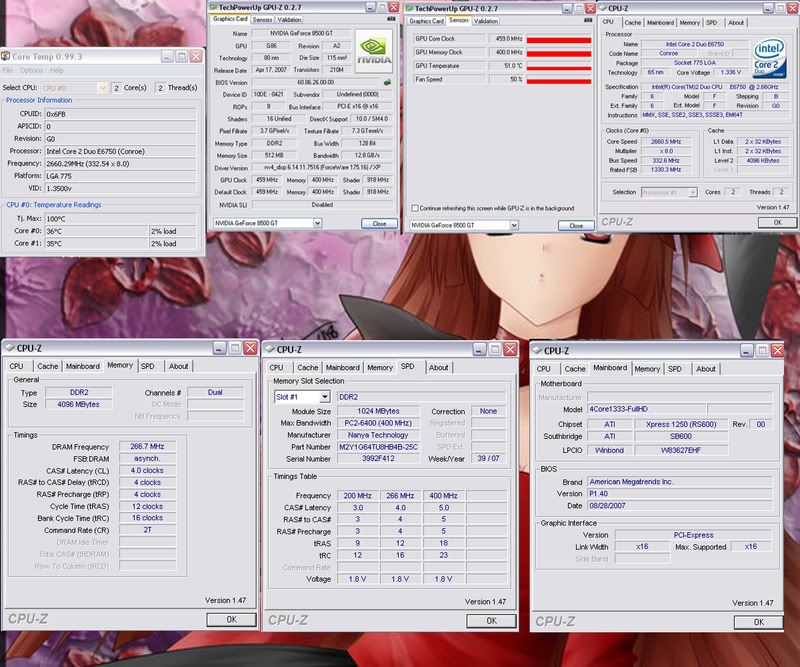
cool spec's guys...here is a screenshot of my xblade details for CPUZ and Tech powerup -
when i get the time i'll also to do the aquamark shyt...
-
Re: The TBCS Overclocking Thread
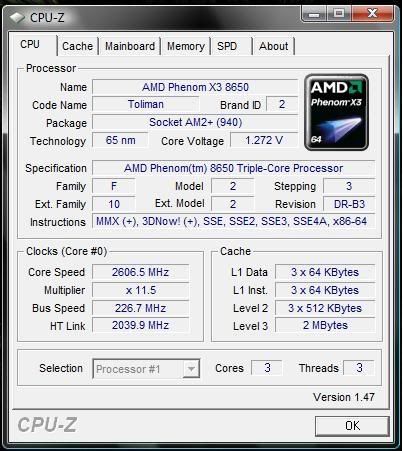
Pushed this new Phenom X3 a little bit.
Current Setup:
Stock HSF
AMD Phenom X3 8650 @ 2.3 GHz
8800GTS and 8200 in SLi
2 WD 160 GB SATA Harddrivesi in RAID_0
MSI K9N2G
550 watt Rosewill PSU
-
Re: The TBCS Overclocking Thread
This is what i just put together only 3 days ago. I'm pretty happy with it. gonna see if i can get 4.5 stable next. so far, 4.4ghz is rock stable, no errors, and a max full load of 59C using Coretemp. Idles around 30C. (core #0 26C/core #1 34C)
EDIT: Tried 4.5, but wont go stable unless i up voltage to 1.4 area, and then my full load temps go up to 65C. And that was only after about 10 mins of orthos. I just stopped it and lowered the clocks.
CPU : Core 2 Duo E8400 3.00ghz @ 4.42ghz 1.376v
Motherboard : ASUS P5Q PRO P45
Memory : 4GB (2x2GB) Corsair Dominator XMS2X4096 DDR2-1066 PC8500 @ 1040mhz 2.1v
Graphics Card : eVGA 8800GTS 512MB G92 670/972 @ 745/1050
Hard Drive : WD Caviar Black 500Gb 32mb cache
Sound Card : Creative SB X-Fi Xtreme Audio
Power Supply : Gigabyte Odin GT 550
Case : Modded Thermaltake Tsunami Dream
CPU cooling : Thermalright Ultra 120 With PWM arctic cooling 120mm fan
UPDATED: Lowered Mutli, Upped FSB. Running ram @ 1:1 fsb, 1040mhz. Temps went up a bit with a little more volts, but still below 60c full load with 2 instances of orthos running. Idle at 32C average for both cores.
Will post 3dmarkVantage screenie soon too.
Stressed using Gromacs core since I'm using vista and its buggy as crap. I'll update it when i get it going properly.
Am i missing any proof? or is this enough?
-
Re: The TBCS Overclocking Thread
CPU : Core 2 Quad 6600 GO revision 1.225 VID 2.40ghz @ 3.551ghz 1.280 volts
Motherboard : ASUS P5Q PRO P45
Memory : 4GB (2x2GB) Kingston Hyperx T1 DDR2-1066 PC8500 @ 1110mhz 2.2v
Graphics Card : eVGA GTX260 Core 216 896mb 576/999 @ 700/1105
Hard Drive : WD Caviar Black 500Gb 32mb cache
Sound Card : Creative SB X-Fi Xtreme Audio
Power Supply : Gigabyte Odin GT 550
Case : Modded Thermaltake Tsunami Dream
CPU cooling : Thermalright Ultra 120 Extreme With Antec tricool 120mm
This is my "newer" setup. Old ram is gettin RMA's, and my old E8400 went into my wifes computer.
Prime 95 stable for 8 hours last pass, no errors. 8 passes of memtest - no errors. This overclock is as stable as stock.
Idle temp between 28-31C, full load around 57-60C
FSB @ 444 x 8
10:8 divider on ram
NB voltage at 1.4
The pic is after only an hour of prime. I forgot to take a screenshot this morning.
-
Re: The TBCS Overclocking Thread
you NEED to water cool that q6600 and get it to 4GHz and more!
-
Re: The TBCS Overclocking Thread
Quote:
Originally Posted by
Spawn-Inc
you NEED to water cool that q6600 and get it to 4GHz and more!
i'll watercool mine, if you watercool yours. :D
My chip hits a wall at 3.6 i think. at least at safe voltage it does. I can get it stable at that, but then my ram is unstable overclocked, or underclocked.
Anything over 3.6, no matter how i do it, is only prime stable for 20 mins tops, before i start getting errors, or BSOD's.
Im happy with my 3.5 out of my free q6600.
-
Re: The TBCS Overclocking Thread
Quote:
Originally Posted by
bartvandenberg
i'll watercool mine, if you watercool yours. :D
My chip hits a wall at 3.6 i think. at least at safe voltage it does. I can get it stable at that, but then my ram is unstable overclocked, or underclocked.
Anything over 3.6, no matter how i do it, is only prime stable for 20 mins tops, before i start getting errors, or BSOD's.
Im happy with my 3.5 out of my free q6600.
done!
i'm not talking about being stable, just enough to bench a few times. thats all i care about i've gotten up to 4.2GHz with mine.
-
Re: The TBCS Overclocking Thread
haha.. nice setup. ok, i wont watercool mine. i dont have the money to do that.
I have to work all day so my wife can spend all day. pretty crappy agreement we have, but at least she cooks for me.
Did i mention, i got my q6600 for free?