I can't host any games because of my router
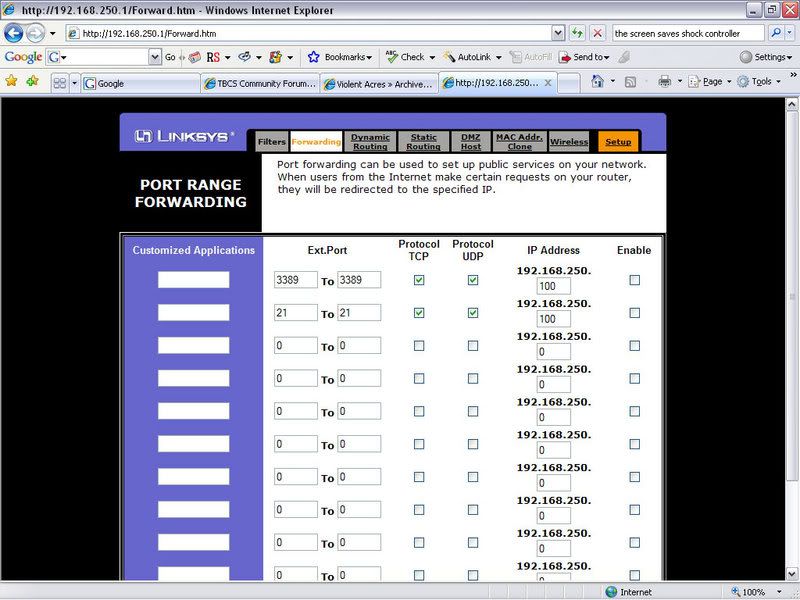
I cannot host anything for any game. I know the problem is my router. I've tried port forwarding, and that hasn't done anything to fix it. It appears that the game sees me as having a local IP, as if I were hosting a LAN game. If I start hosting a game, and check the IP of the server I'm hosting, it says 192.168.1.105, as if I were just in a LAN game, rather than my actual IP itself. Anyone have any ideas? It's a Linksys WRT54G.
Re: I can't host any games because of my router
Hamachi
I found it when I was looking for ways to get an IP outside my Router and for my brothers to play Starcraft on Battle.net and be on the same network. It worked for Starcraft and for Age of empires.
https://secure.logmein.com/products/hamachi/vpn.asp
It was bought up by a site called LogMeIn for remote access to computers over the internet. hope this helps out.
Also this allowed me to use Doom95 and play Doom over the internet with my brothers like we were on the same home network.
Re: I can't host any games because of my router
So I download that, create a network with it, have someone else download it, have them join my network, and then I can go make a gam and they should be able to join?
Re: I can't host any games because of my router
o.O that sounds like more trouble then it should... I'm sure there is another way around that.
Re: I can't host any games because of my router
Quote:
Originally Posted by
DaJe

So I download that, create a network with it, have someone else download it, have them join my network, and then I can go make a gam and they should be able to join?
Exactly, but make sure your file and print sharing is off because its just like having them on your own network. If you have anything shared then they can access. My brother kept his on and I could access everything in his shared folder all the way here in NE and he's in NH.
Re: I can't host any games because of my router
Downloading extra software isn't the way to go. What you need to do is setup port forwarding on the router, and have your friends connect to your WAN address (www.whatismyip.com) and then use the port number. For example, if your WAN address is 10.1.0.1, and your game uses port 1111, then your friends will tell their game to look for the server at 10.1.0.1:1111. So then lets assume that the computer you want to host the game on is 192.168.1.5 on your local network. Tell the router to forward port 1111 to 192.168.1.5 so that any packet coming in to the router will then be forwaded on to the correct machine. I would also set that machine with a static address so you don't have issues with the IP refreshing all the time.
Re: I can't host any games because of my router
That reminds me Sarge, are you still planning on doing a how-to for a home server?
Re: I can't host any games because of my router
Yeah, it's still on. Actually, I just updated last week with some of the squid configs. Things aren't exactly going as I would like. Some jagoff on craigs list screwed me outta $40 for a new video card, so my other computer is still out of commission. I'm going to file a police report on him this week. Anyway, I'll see what else I can do and post it up.
Re: I can't host any games because of my router
you turned off windows firewall? that is 99% of all network problems with games.
I'm not sure what Linksys has, but my dlink has a DMZ feature which DMZ (Demilitarized Zone) is used to allow a single computer on the LAN to be exposed to the Internet.
This essentially allows you to bypass the router and any firewall and expose yourself to the internet. This would allow you to host your games. But that can only be done still if windows firewall is disabled. And it must be disabled, not just configured to let your game through.
Re: I can't host any games because of my router
Quote:
Originally Posted by
alexanderH
you turned off windows firewall? that is 99% of all network problems with games.
I'm not sure what Linksys has, but my dlink has a DMZ feature which DMZ (Demilitarized Zone) is used to allow a single computer on the LAN to be exposed to the Internet.
This essentially allows you to bypass the router and any firewall and expose yourself to the internet. This would allow you to host your games. But that can only be done still if windows firewall is disabled. And it must be disabled, not just configured to let your game through.
That's kind of a dangerous suggestion. Although it will work, it's also opening his computer up to all the nasties the internets can throw at him. Trust me, port forwarding is the way to go.